Why setting Target ROAS and budgets manually costs hours
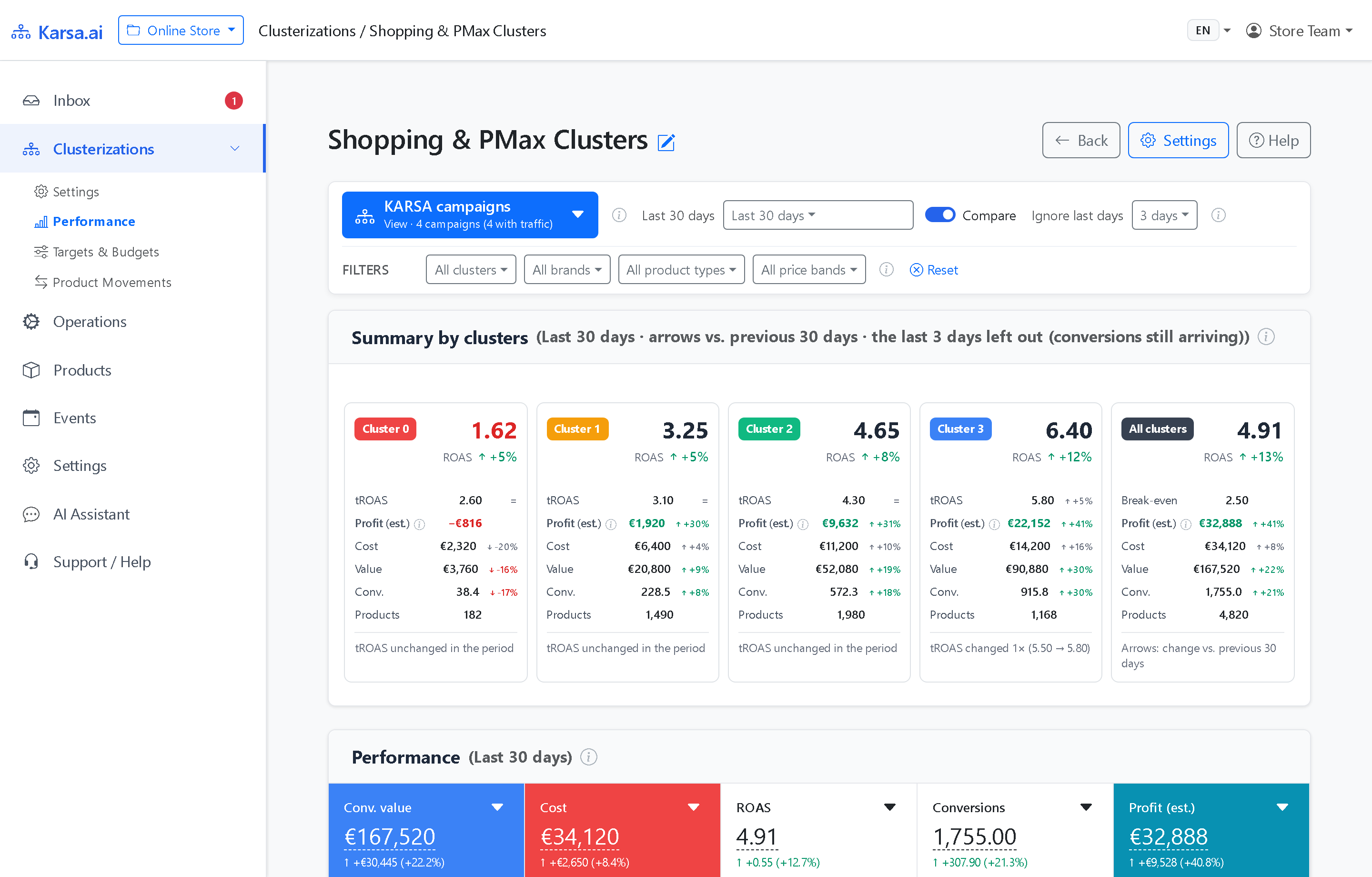
Homogeneous clusters (C1, C2, C3… plus optional C0) unlock higher returns only when each campaign gets the right Target ROAS and daily budget.
Checking that by hand takes hours per account. Specialists must reconcile change logs, conversion delay, cluster margins, budget caps, Search Impression Share, and hourly spend across separate screens.
Karsa.ai Profit Target Calibration (PTC) automates the entire statistical preparation so specialists spend minutes reviewing decisions rather than building spreadsheets.
Computes cluster break-even ROAS, measured conversion delay, wait gates, and three scenarios with uncertainty ranges before any AI runs.
Reads verified statistics only and writes a two-layer report with live portal charts. No invented numbers or guesswork.
Checks every reported metric, currency, break-even floor, and unlock date against the statistical data pack before delivery.
Holds new edits until delayed conversions mature, then unlocks one lever per cluster while keeping control groups steady.
Statistics first, AI text interpretation second (zero synthesis)
Generic AI tools fail on PPC budgets because language models guess arithmetic or blend unverified assumptions with live metrics. Karsa.ai PTC separates mathematical computation from text interpretation:
- Deterministic statistical pack: Before any AI runs, Karsa.ai queries live Google Ads campaign settings in your account currency and time zone. It calculates each cluster’s break-even ROAS, measured conversion delay, budget utilization, auction CPC trends, and three modeled scenarios with explicit uncertainty ranges.
- AI text interpretation only: The AI analyst never calculates numbers or synthesizes estimates from scratch. It reads the prepared statistical pack and translates it into a concise Executive Summary plus a Detailed Cluster Analysis with live embedded portal charts.
- Automated 1:1 QA verification: Before a report ships, a deterministic QA gate verifies every table total, break-even floor, currency symbol, and unlock date. Any mismatch against the source data blocks delivery.
- Continuity with anti-anchoring protection: Every new PTC run compares the prior report’s recommendation against live Google Ads settings. Fresh mature data always overrides older assumptions, so conclusions adjust transparently whenever market conditions shift.
How long to wait after a change (and why early edits hurt)
In Google Shopping and Performance Max, ad cost appears right away on click date while purchases often arrive days later. Reacting after 48 hours leads to premature reversals on healthy campaigns.
PTC removes guesswork around timing with two clear safeguards:
- Measured delay hold window: PTC measures your store’s real conversion lag and applies one unified waiting period to Target ROAS and budget edits. Until that window closes, the report displays a clear Hold verdict alongside the exact unlock date for the next review.
- Clear split between mature and recent dates: Every strategic scenario builds exclusively on fully matured days. The trailing incomplete dates appear separately as a fresh spend signal and are never mixed into the scenario baseline.
Three scenarios per cluster: Defensive, Profit, and Volume
Once mature data unlocks a new decision wave, Profit Target Calibration (PTC) computes three transparent options per cluster. Measured historical metrics stay clearly separated from modeled elasticity ranges:
| PTC Scenario | Primary Objective | Typical Lever Adjustment | When PPC Specialists Choose It |
|---|---|---|---|
| 1. Defensive | Protect net margin & cut losses | Raise Target ROAS toward a safer buffer or lower daily spend caps on weak groups | Tight cash-flow periods, post-season demand drops, or stock limits |
| 2. Profit (Balanced) | Maximize net earnings after ad spend | Tune Target ROAS or budget where marginal spend clears break-even ROAS | Standard year-round optimization for profitable online stores |
| 3. Volume (Growth) | Capture wider profitable market share | Expand daily budget or relax Target ROAS on strong clusters above break-even | Peak season, customer acquisition pushes, or high-LTV categories |
Four disciplined guardrails built into every PTC wave
1. Single-lever discipline per cluster
Each cluster changes either Target ROAS or daily budget in one step, never both at once. Spend cap increases apply only to non-shared campaigns hitting real budget ceilings, avoiding unnecessary CPC spikes.
2. Control clusters kept steady in every wave
Updating every campaign on the same day makes it difficult to separate your edits from weekly demand swings. Across larger setups, PTC adjusts only part of the profitable clusters per wave and leaves remaining groups steady as a live control reference.
3. Cluster-specific break-even floor and fail-closed safety
Each cluster carries its own break-even ROAS computed from the active SKUs currently inside it, across all five Karsa.ai margin modes. If break-even margins are unverified or key auction signals such as Impression Share are missing, PTC holds expansion rather than guessing.
4. Two-layer report with contextual PTC chat
Busy managers read the one-page Executive Summary first, while specialists inspect full cluster tables, live portal charts, and top loss-making items below. A dedicated PTC discussion chat sits alongside the report. Specialists can ask "Why not lower Cluster 3 further?" or "Which SKUs lost money last week?" directly against the verified data pack.
Five analyses prepared in the Portal (Targets & Budgets)
The same interactive charts embedded in PTC reports stay live inside Targets & Budgets. They combine Google Ads metrics with your margins and conversion delay on one screen:
- Goals, returns & net earnings: Top row plots Target ROAS, achieved 7-day results, and break-even floors per cluster, shading incomplete recent dates. Bottom row plots daily profit after ad spend with a dashed marker at every target edit.
- Impression share vs. rank & budget losses: Plots 7-day averages from your production go-live date. You spot right away when budget ceilings restrict top campaigns.
- Campaign reaction to target edits: For isolated ROAS changes, Karsa.ai compares one week before and after while removing account-wide trends. Results sit against the 90% range of normal weekly fluctuation.
- What would a new target do?: Splits 60-day spend by product ROAS and margin below and above a candidate setting. Loss-making spend separates cleanly from profitable value at risk using historical data.
- Changes in Google Ads and what followed: Lists every target or budget edit with 14-day before/after results against your remaining account. Incomplete conversion windows stay clearly marked.

Frequently asked questions
Does Karsa.ai overwrite Target ROAS or budgets automatically in Google Ads?
No. Karsa.ai never edits bids, Target ROAS, or daily budgets through the Google Ads API. PTC delivers a verified report with concrete options per cluster, and your PPC specialist applies any chosen change directly in Google Ads.
Does the AI invent numbers or synthesize estimates on its own?
No. Every financial metric, break-even floor, waiting window, and scenario table is computed deterministically before the AI runs. The AI agent only interprets that prepared statistical pack into clear text, and automated QA checks every figure 1:1 before delivery.
How long should we wait after changing Target ROAS or a daily budget?
Acting after 48 hours reacts to incomplete recent days before delayed purchases arrive. PTC measures your store’s actual conversion delay and applies one unified waiting rule to Target ROAS and budget edits. Every report shows the exact unlock date.
Why does PTC adjust one lever per cluster and hold control groups steady?
Changing both Target ROAS and daily budget at once makes impact hard to isolate. Keeping one lever per cluster while leaving control groups unchanged separates real campaign effects from market swings.